Data Structures 1주차 수업 정리
1, 2강 정리
1_Intro to Data Structure
2_Introduction to Python
1_ Intro to Data Structure
Data Structure
- ways of organizing and storing data in a computer
Programs = Algorithms + Data Structures
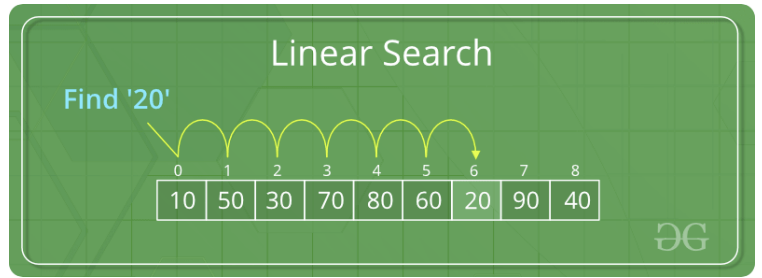
- Program: search a specific number
- Algorithm: sequential search
- Data Structure: array
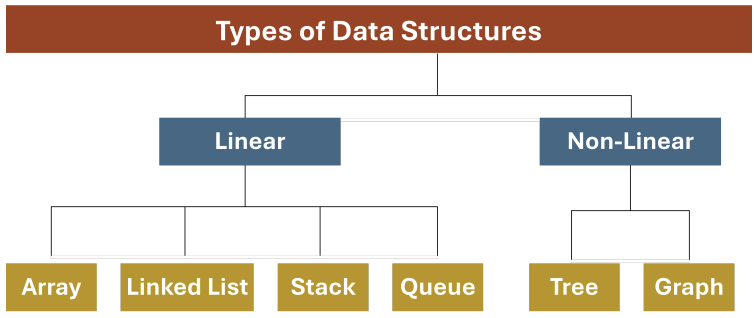
Types of Data Structure (요약)
1. Linear: data elements are arranged sequentially or linearly
e.g. array, list, stack, queue

2. Non-linear: data elements are on non-sequentially or in multiple levels
e.g. tree, graph

Types of Algorithms
- sorting, searching
- creating minimum spanning tree
<Data Structure>
➡️ Array, Linked List, Stack, Queue, Tree, Graph
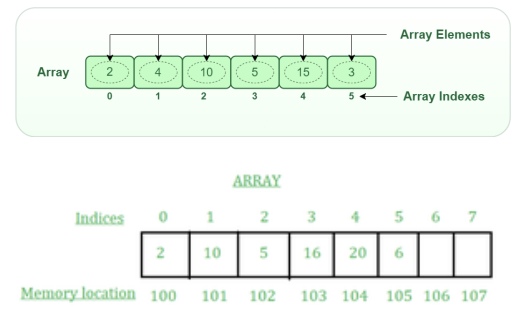
1. Array (or Simple List)
- A collection of items of same data type stored at contiguous memory locations
- A static data structure with a fixed memory size, i.e., once the size is given to it, it cannot be changed
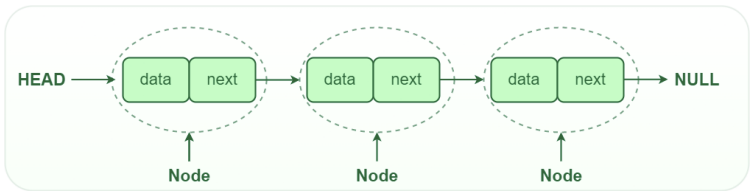
2. Linked List
- A collection of items of same data type not stored at a contiguous location, but rather consists of series of connected nodes
- A dynamic data structure does not have any fixed memory size, i.e., its size can be changed.
3. Stack
- A pile of arranged objects
- The insertion of a new element and removal of an existing element takes place at the same end at the top of the stack
- LIFO(Last In First Out) or FILO(First In Last Out)
4. Queue
- A line of things
- The insertion of a new element and removal of an existing element takes place at the opposite end
- LILO(Last In Last Out) or First In First Out (FIFO)
5. Tree
- A tree data structure has a root, branches, and leaves
- The difference between a tree in nature and a tree in computer science is that a tree data structure has its root at the top and its leaves on the bottom
- A hierarchical structure that is used to represent and organize data in a way that is easy to navigate and search
- Tree consists of nodes of parent-child relationship
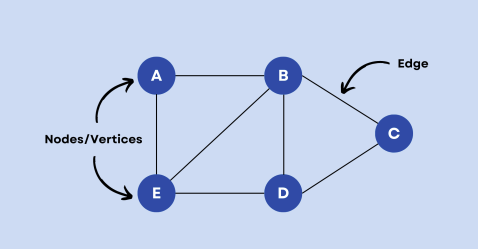
6. Graph
- A diagram showing the relation between variable quantities
- A Graph consists of vertices/nodes and edges
<Algorithms>
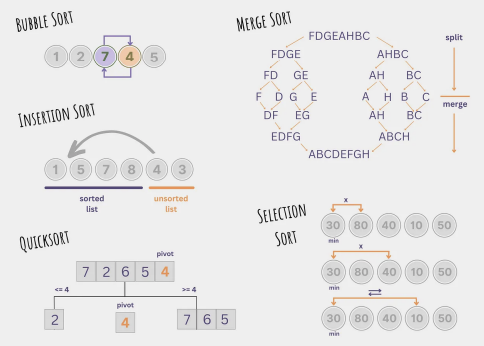
1. Sorting
- Puts elements of a list into an order
2. Searching
- Trying to find something by seeking carefully and thoroughly
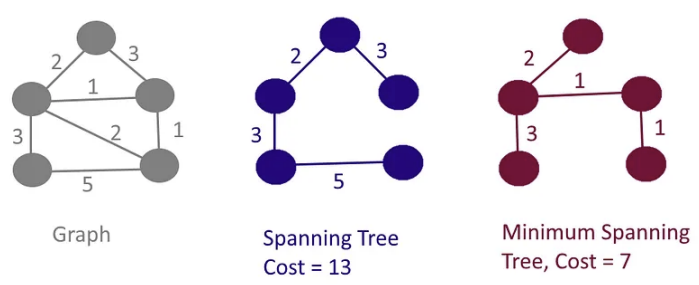
3. Creating Minimum Spanning Tree
- Minimum Spanning Tree: a subset of the edges of a connected, edge-weighted graph that connects all the vertices together without any cycles and with the minimum possible total edge weight
- Prim’s algorithm, Kruskal’s algorithm, etc
2_Introduction to Python
보충 필요한 부분만 정리함
Attributes
- class creates a user-defined data structure
- Attributes: the variables that belong to a class
- Attributes can be accessed using the dot (.) operator
class MyClass: # a class in its simplest form
 name = "Ewha" # attribute: a variable that belong to a class
 age = 25
myobject = MyClass() # an object in its simplest form
print("My name is", myobject.name)
print("I'm", myobject.age, "years old")
## My name is Ewha
## I'm 25 years old
self Parameter
- A reference to the current instance of the class, and is used to access variables that belongs to the class
class MyClass:
 name = "Ewha"
 age = 25
 def myname(self): # a function that belongs to the class
 print("My name is", self.name)
 print("I'm", self.age, "years old")
myobject = MyClass()
myobject.myname()
print("Access name variable inside object:", myobject.name)
print("Access age variable inside object:", myobject.age)
## My name is Ewha
## I'm 25 years old
## Access name variable inside object: Ewha
## Access age variable inside object: 25
__init__() Function
- A function which is always executed when the class is being initiated
- __init__: used to initialize objects of a newly created object of a class
class MyClass:
 def __init__(self,name,age):
 self.name = name
 self.age = age
 def myname(self):
 print("My name is", self.name)
 print("I'm", self.age, "years old")

myobject = MyClass(name="Amy", age=55)
myobject.myname()
print(myobject)
## My name is Amy
## I'm 55 years old
## <__main__.MyClass object at 0x0000000052F37CD0>